How to combine number columns?

DataGraph Forums › Technical Support › Support Desk › How to combine number columns?

  • This topic has 3 replies, 2 voices, and was last updated 1 year, 8 months ago by Jean-Yves Le Stang.
Viewing 4 posts - 1 through 4 (of 4 total)
  • Author
    Posts
  • #15540
    Xingyu Leo
    Participant

      For example, I have two number columns, the first one has 1, 2, 3, and the second one has 4, 5, 6. How to combine these two columns into one? So that in the combined column, I could have 1, 2, 3, 4, 5, 6.

      #15541
      Jean-Yves Le Stang
      Participant

        Hello,

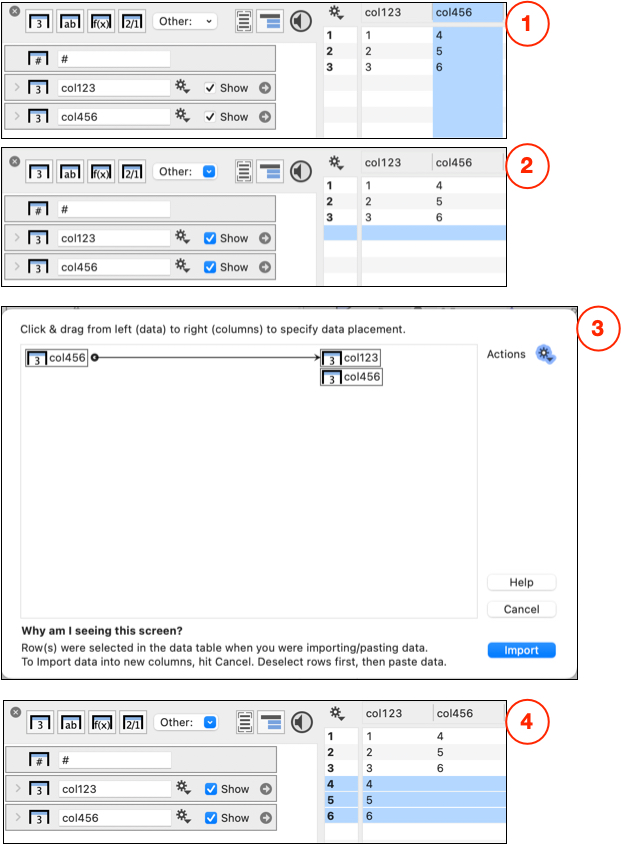
        Make only column col123 and column col456 visible, with col123 on the left position. Then:

        1. Select and “Copy” the whole column col456
        2. Select the whole row after the last row of  col123 and make a “Paste”
        3. The special import parser will pop-up. Click and drag the arrow from col456 to col123. Hit the import button.
        4. This will append col456 below col123

        Export

        I hope this will help

        #15542
        Jean-Yves Le Stang
        Participant
          #15543
          Jean-Yves Le Stang
          Participant

            As basis for data input, I suggest you also have a look at Section 3,  “Importing data”, of DG manual V5.4

          Viewing 4 posts - 1 through 4 (of 4 total)
          • You must be logged in to reply to this topic.

          DataGraph Forums › Technical Support › Support Desk › How to combine number columns?