Referencing columns with complicated names

DataGraph Forums › Technical Support › Feedback and Suggestions › Referencing columns with complicated names

Viewing 3 posts - 1 through 3 (of 3 total)
  • Author
    Posts
  • #15868
    Mateusz
    Participant

      Hello,

      I like to use descriptive names for columns so that my spreadsheet looks informative even for others. However, when using expression columns, the software does not recognise group names with spaces. Is there a special syntax I could use to reference group names that contain spaces and symbols, like “XYZ 500 °C”? In order to refer to such a group, I am forced to change the name to something like “XYZ500”.

      Not a big deal but it would a great a quality of life for me though I still think I am missing something and it is easily doable.

      Kind regards
      Mateusz

      #15869
      kirkt
      Participant

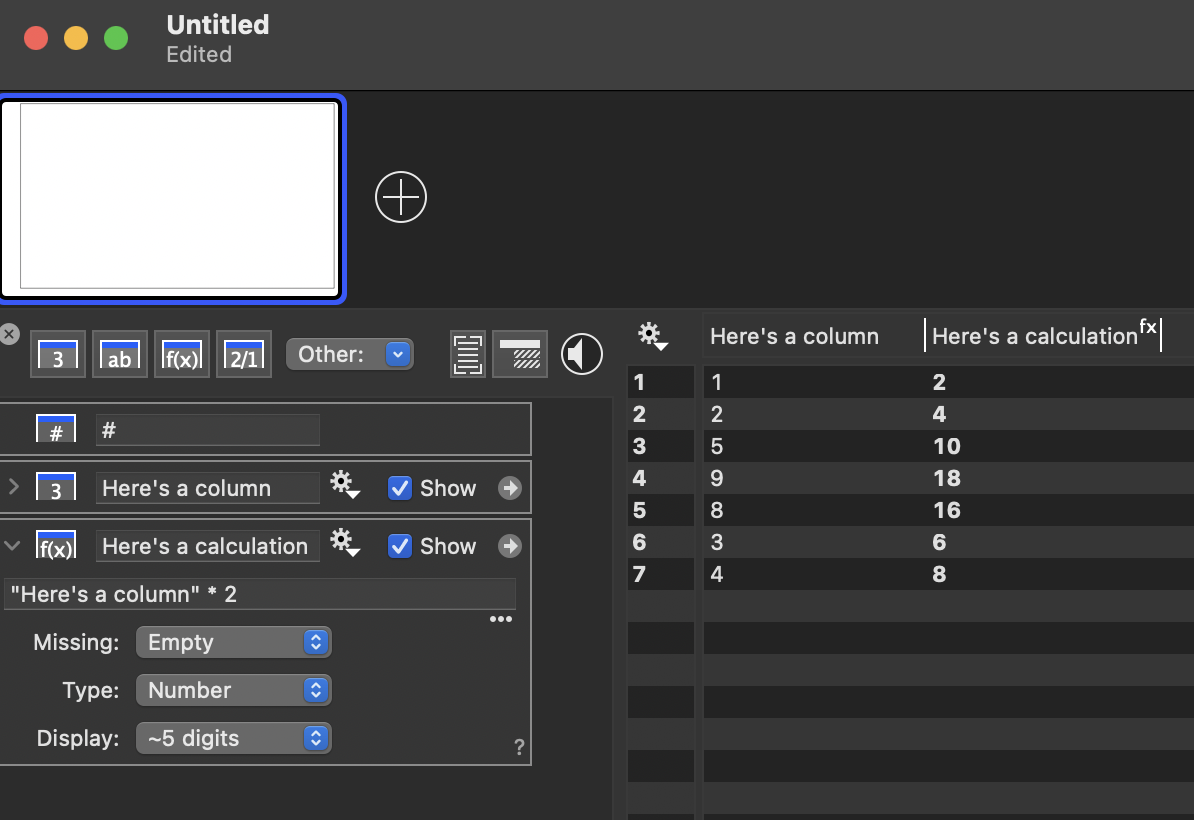
        You can place the column name within quotes (“nice column name”) in the expression and not have to condense or change your nice text column names.  I hope this is a helpful solution!

        KirkScreenshot 2026-02-12 at 5.18.06 PM

        #15870
        dgteam
        Moderator

          FYI – There is also a Redirect column that can be useful if your expression names get really long. With the Redirect column you essentially assign an alias.  Then you can use the shorter name in an expression.

        Viewing 3 posts - 1 through 3 (of 3 total)
        • You must be logged in to reply to this topic.

        DataGraph Forums › Technical Support › Feedback and Suggestions › Referencing columns with complicated names