How to do set-up imports with mixed column separators in same file
DataGraph Forums › Technical Support › Support Desk › How to do set-up imports with mixed column separators in same file
Tagged: importing data
- This topic has 2 replies, 2 voices, and was last updated 1 year, 6 months ago by
nautile.
-
AuthorPosts
-
May 7, 2025 at 11:53 am #15621
nautile
ParticipantHello –
I have hundreds of data files with mixed column separators – this is an example:
Time(s),a_x,a_y,a_z,Norm(a)
0.000000 0.000000 0.000000 0.000000 0.000000
0.100000 0.001364 0.000000 0.000000 0.001364
0.200000 0.002595 0.000000 0.000000 0.002595
0.300000 0.003572 0.000000 0.000000 0.003572
0.400000 0.004199 0.000000 0.000000 0.004199Do you have an online example or video with the data importer that shows how to handle this during imports with multiple files from a folder?
Thanks ! – J
May 10, 2025 at 12:11 pm #15643 dgteamModerator
I think the Import Special feature could help you. We have an older webinar that shows the basic of how to set it up and save the parser that might be helpful:
Webinar Recording: Importing and Connecting Datasets
40:35 Create Custom ImportersI did not see instructions on how to handle multiple files. Something we should do because this feature can be sooo helpful for importing lots of files at once. I’ll put that on our to do list 🙂
For now, I’ve taken the data that you sent as an example and shown how I would set this up using import special.
You can set up a header that would basically skip over the first line. Then set up the record definitions to import all of the numerical data. You would have to manually enter the names of the columns in the header definition. You can actually just copy paste the text from the preview window. But if your files all have the same format, then you would only have to do this once.

In the bottom left corner you can use the gear menu to select a group of files to import at once. To keep track of which data comes from which file, assuming the file names are unique, you can click the include file names as column checkbox.
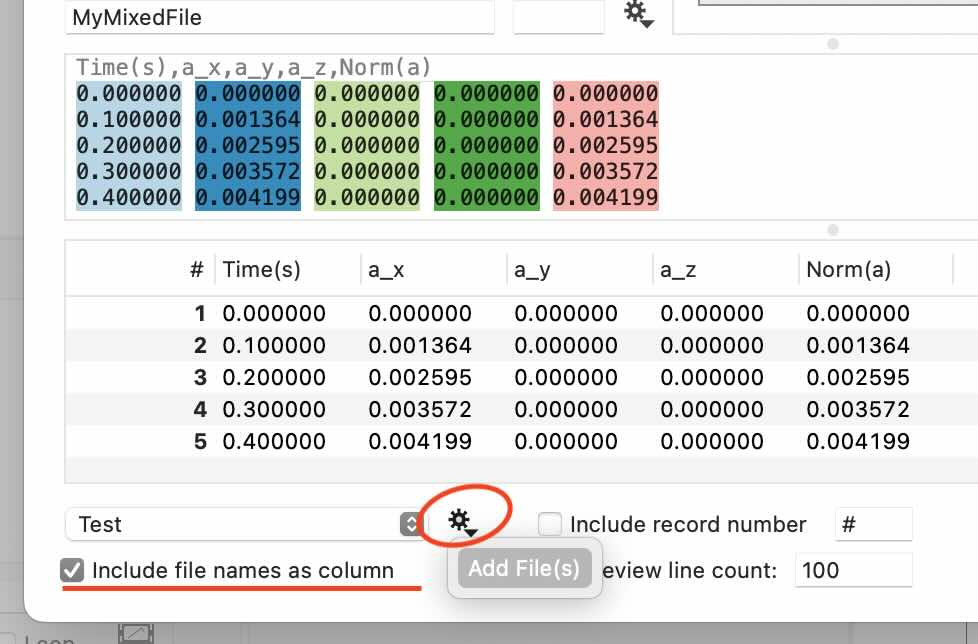
There’s also a really neat functionality where you can save the settings and if these files happen to have a unique file extension, you can set it up where any file you import with that file extension will automatically be run through this parser, even if you just drag and drop the file onto DataGraph.
Hope this helps!
May 10, 2025 at 3:18 pm #15644ParticipantHello –
Thanks for the tips and that link !
I’ve got everything working now quite smoothly – I’d never really done much with the importer, since drag and drop mostly works with my use cases. That tip for identifying the file extension is a great idea (I was wondering what that box was for !)
I’ve now also added a pre-step to your method that gets the column names in too. I created a separate parser that *only* treats the the first line of text. Once I have the text highlighted in the importer preview, I use the right-click trick to add them as titles to the columns. No more re-typing !
Then, I stay on the same file, and switch to my data only parser (that’s the one you’ve so kindly shown above), except I uncheck the box to “overwrite column names” and leave checked the option to overwrite formats, and add the filenames. Works like a charm.
Anyway, it’s saving me tons of time and all the re-typing of awkward, coded column names. Thanks again – J
-
AuthorPosts
- You must be logged in to reply to this topic.
DataGraph Forums › Technical Support › Support Desk › How to do set-up imports with mixed column separators in same file